Manual outreach is slow. Automated outreach gets you flagged.
Quillbolt makes it fast without getting flagged.
Your outreach isn't failing because of the tool. It's failing because you skipped a step.
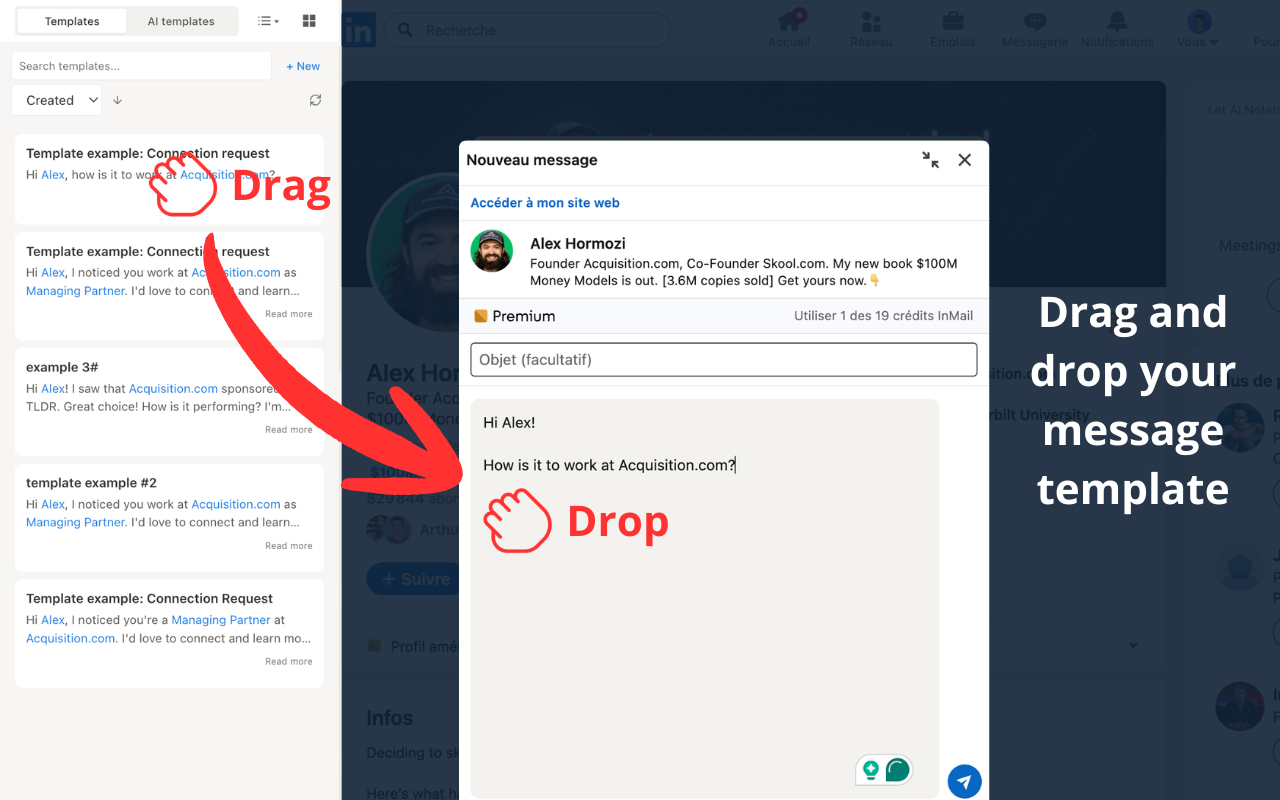
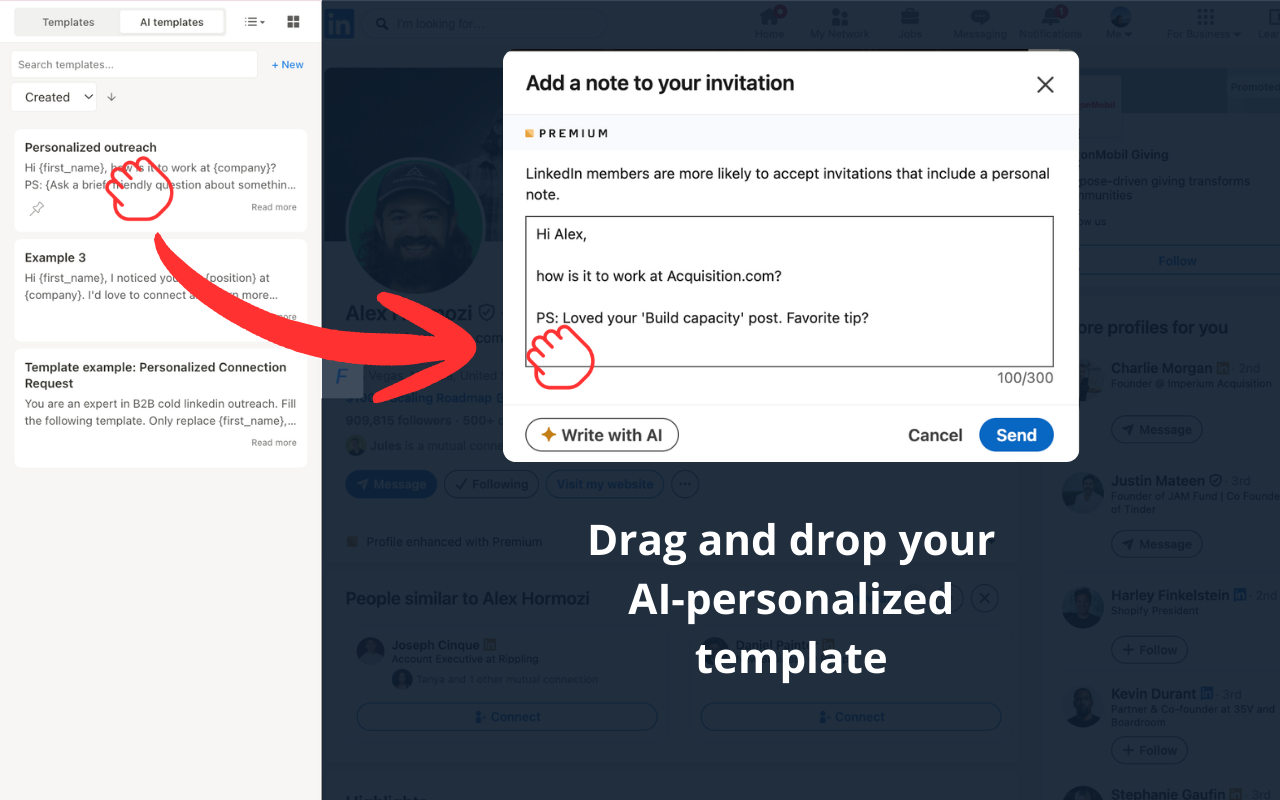
AI message templates, right inside LinkedIn. Drag, drop, send. You're always the one clicking.
Supercharge your manual LinkedIn outreach
If you're an SDR, AE, or founder who still prospects manually on LinkedIn, good. Manual outreach converts better. But it's painfully slow. Quillbolt fixes the speed problem without killing the personal touch.
Create a message template once. Quillbolt fills it in for every prospect using their real profile data. Drag it into the message box and send. One template, hundreds of personalized messages.
Most reps jump straight to automation: blast 500 connection requests, hope for 3% response rate, wonder why LinkedIn flagged them. The messages feel generic because they are generic. The missing step? Learning what actually resonates with each audience. Quillbolt is where you figure it out. Fast enough that manual outreach becomes practical, personal enough that prospects actually reply.
How Quillbolt works
Open the sidebar
Click the Quillbolt button on any LinkedIn profile. The sidebar opens right inside LinkedIn. No tab switching, no external dashboard.
AI reads the profile
Pick a template and the AI analyzes the prospect's real profile data (job title, company, recent activity) and generates a personalized message.
Drag, drop, and send
Drag the message into LinkedIn's message box. Edit if you want, then click send yourself. You're always in control.
One org. Multiple templates. Every angle covered.
Enterprise orgs have layers: VPs, champions, gatekeepers. Quillbolt's template system lets you craft a different message for every role in the org chart.
"I noticed {company} just raised Series B. At Techpresso, we help scaling teams keep their sales pipeline personal as they grow..."
"Your team's work on {technology} caught my eye. We've built something that might complement your outreach stack..."
"Hi {firstName}, could you point me toward the right person at {company} for sales tooling decisions? Happy to keep it brief."

Why I built Quillbolt
As the Head of Sales at Techpresso, I was spending 3 hours a day sending LinkedIn messages. I didn't want to automate it. The best way to reach a company is to go on their LinkedIn page, look at the people working there, and find the right person to contact. Then you adapt the message based on what you're reading on their profile.
I just needed a tool that let me create multiple message templates, reliably replace placeholders like {name} or {company}, and make quick edits before sending. I couldn't find it, so I built it. Now I prospect 3x faster and every message sounds like I spent five minutes on it.
"Really useful extension for LinkedIn outreach. The templates save me a lot of time and are easy to manage. The AI feature also helps differentiate my messages when contacting people. A simple, effective tool that makes LinkedIn messaging much smoother!"
Works with your stack
Quillbolt isn't replacing your automation tools. It's the step that makes them work. Learn what converts with Quillbolt, then scale it.
Simple pricing. No surprises.
Start free. Upgrade when you need unlimited. Cancel anytime.
Free
- 30 message generations per day
- Unlimited saved templates
- Works on any LinkedIn profile
- Drag & drop messaging
Premium
- Unlimited AI generations
- Unlimited saved templates
- Sequence editor for multi-step outreach
- All free features included
Frequently asked questions
Will Quillbolt get my LinkedIn account banned? +
No, it never sends messages automatically and never performs any bot activity. You write the template message (or let AI draft it), then you drag it into the message box and click send yourself. LinkedIn sees normal human behavior because that's exactly what it is.
How is this different from Waalaxy or PhantomBuster? +
Those tools automate sending. Quillbolt helps you write better messages before you send them. Think of it as the step before automation: you use Quillbolt to learn what messaging works for each audience, then automate the winning messages with tools like Waalaxy. They're complementary, not competitors.
What does the AI actually do? +
When you open Quillbolt on a LinkedIn profile, the AI reads the prospect's real profile data (job title, company, recent activity, skills) and generates a personalized message based on your chosen template. It's not mail merge with variables. The AI understands context and crafts a message that sounds like you actually read their profile.
Can I cancel anytime? +
Yes. Premium is month-to-month via Stripe. Cancel anytime from your account settings, no questions asked. You'll keep Premium access until the end of your billing period, then drop back to the free tier.
Does Quillbolt work with Sales Navigator? +
Yes. Quillbolt's sidebar appears on any LinkedIn profile page, including profiles you access through Sales Navigator. The AI reads the same profile data regardless of how you navigated there.
Is my data safe? +
Quillbolt only processes the LinkedIn profile data visible on the page you're viewing, the same information any visitor can see. Your templates and message history are stored securely and never shared. We don't even ask for your LinkedIn credentials or see them.
On mobile? Send the install link to your desktop.
One email. No spam. Just the Chrome Web Store link.
Ready to send better messages?
Launching soon. Get early access and we'll email you the day it goes live.
Get early accessYou're always the one clicking send. Zero bot activity.